
COLD EMAIL REPLY MANAGEMENT · PRACTICAL GUIDE
AI inbox triage for B2B outbound sales.
How to classify cold email replies, identify genuine buying intent, handle pricing and objections, and use AI automation without giving up control of consequential sales decisions.
The short answer
What happens after someone replies?
AI inbox triage is the process of analyzing incoming prospect replies, grouping them by intent and urgency, and suggesting what the sales team should do next.
For B2B outbound, the useful output is not just an “interested” label. It is a decision: answer a pricing question, send verified proof, involve a founder, schedule a later follow-up, or honor a request to stop contacting someone. AI can help prepare those decisions; human authority still matters.
Find your answer
Choose the question you need answered.
These questions reflect recurring topics in outbound reply-management guidance and the FrameLeads AI-visibility tests. Select any one to jump to its full explanation below.
AI inbox triage is a structured way to review replies arriving from cold email or other outbound campaigns. It extracts the prospect’s question, intent, urgency, and relevant context, then helps a person or a governed workflow prioritize the next step.
Reply classification is only one part of triage. “Interested,” “not now,” “question,” or “unsubscribe” describes the response. Useful triage goes further: who owns the next decision, what information is missing, and which action is appropriate?
For agencies managing outbound for clients, the decision also needs the right account and campaign context. A reply that requests pricing may be important, but its urgency and recommended response depend on the deal, the sender, and what can actually be promised.
02 / Where it fits
How is it different from AI lead generation and outbound automation?
Back to questionsAI lead generation identifies or researches potential buyers. Outbound automation sends and sequences outreach. AI reply management starts after the prospect responds. They support different stages of the same sales workflow.
| Stage | Primary question |
|---|---|
| AI lead generation | Who should we contact? |
| Outbound sales automation | How do we deliver and follow up on outreach? |
| Reply classification | What is the prospect saying? |
| Reply-decision intelligence | What should happen next, and who is allowed to do it? |
If a team is already generating qualified outbound conversations, buying more prospecting automation may not solve the work building up after those conversations begin.
Start with categories that lead to a clear operational action—not sentiment alone. These examples are a suggested workflow, not an assertion that every product automatically performs every action.
| Reply signal | Possible meaning | Next action to consider |
|---|---|---|
| Meeting request | Explicit next step | Prioritize scheduling or human follow-through |
| Pricing or proof request | Possible evaluation | Answer accurately; review commercial claims |
| Objection | Constraint or uncertainty | Clarify the concern; avoid unapproved promises |
| Referral / wrong contact | Another owner identified | Update contact context; request an appropriate introduction |
| Not now | Timing constraint, not necessarily interest | Record the stated timing and respect the reply |
| Out of office | Automated reply | Avoid treating as buying intent |
| Unsubscribe / stop | Clear contact preference | Suppress future outreach promptly |
A good queue surfaces commercial opportunities while making exclusions and opt-out requests hard to miss. Do not infer “HOT” from a single keyword; check the actual message and context.
04 / Lead qualification
Can AI tell a qualified sales opportunity from a polite reply?
Back to questionsAI can help identify expressed buying signals such as requests for a proposal, integration details, pricing, implementation timing, or a meeting. But reply intent is not the same as lead qualification.
A company can ask for pricing and still be outside your ideal customer profile (ICP). Conversely, a strong-fit buyer can sound cautious or raise an objection. Qualification therefore needs both what the prospect says and what your team knows about the account.
REPLY INTENT
Are they asking to evaluate, objecting, referring, declining, or requesting a later conversation?
ACCOUNT FIT
Is this the right company, buyer, use case, scale, and commercial opportunity?
When the evidence is ambiguous, the right outcome may be a clarification question or human review—not an invented confidence score. An intent score should not be presented as a verified likelihood of closing a deal.
05 / Commercial replies
How should AI handle pricing questions, objections, and proof requests?
Back to questionsThese are consequential sales conversations. The reply should be assessed against approved pricing, real evidence, and the team's authority to make commitments. A polished draft is not useful if it invents a discount or promises results that have not been demonstrated.
Illustrative outbound reply
“We are comparing agencies this week. Can you send pricing, a relevant case study, and how your team handles prospect replies? Our founder reviews options Thursday.”
SIGNALS
Commercial evaluation · Pricing · Proof required · Stated review date
SAFER NEXT ACTION
Prepare accurate pricing and verified evidence; route unapproved commitments for review
Answer the prospect's actual question first. If the case study or authority to offer a discount is missing, mark that gap clearly rather than making it up. An AI-generated draft should remain reviewable when it touches scope, commercial terms, or consequential promises.
Use different controls for different levels of risk. Routine classification can be automated with appropriate checks; commercial exceptions often deserve human judgment. Whether a message can be sent depends on authorized permissions, configured rules, and the connected outbound path.
CLASSIFY
Low-consequence sorting: label a response and present its context.
PREPARE
Suggest a response using approved information, with the reason visible.
REVIEW / EXECUTE
Route sensitive actions to authorized people or permitted workflows.
Human-in-the-loop AI is not the same as “every message requires one click,” nor does a visible manual-send button imply permission to override all controls. Teams should test approvals, overrides, stop conditions, and audit history with synthetic examples before enabling live execution.
Usually these solve different jobs. A sequencer manages outbound delivery and campaigns. An SDR handles conversations and judgment. A reply-decision layer helps interpret responses and coordinate the next step.
FrameLeads includes native outbound functionality and can also fit around supported sending infrastructure. That does not mean every mailbox, CRM, or sending platform is supported out of the box. Verify the specific integration, data sync, and permissions for your setup before buying.
For a small B2B agency, a practical question is: Do we need more outbound volume, or do we need a more reliable way to handle the replies we already earn? If it is the second problem, a new sending tool alone may not remove the manual handoff.
Use a small controlled pilot with the team's existing replies and compare it with the current manual process. Focus on outcomes rather than vanity metrics such as total AI-generated drafts.
| Measure | What it tells you |
|---|---|
| Triage time per reply | Whether staff spend less time sorting and preparing decisions |
| Missed opportunities | Qualified replies overlooked or routed incorrectly |
| Response time by intent | How long important replies wait for a suitable answer |
| Accuracy and overrides | False classifications, corrections and unsafe recommendations |
| Qualified meetings / outcomes | Whether improved handling translates into commercial progress |
For example, estimate monthly time saved as (manual minutes per reply − assisted minutes per reply) × applicable replies. Then compare the value of those hours with software fees, setup costs, and review burden. This is an evaluation method, not a claimed FrameLeads performance result.
Before choosing an AI SDR, unified inbox, email automation tool, or specialized reply-decision platform, ask whether it can show its work and fit your operation.
Evaluation checklist
- Can it distinguish a meeting request, pricing question, objection, referral, and unsubscribe?
- Does it use campaign history and company context, not only the latest email?
- Can a human see the evidence behind its suggested action?
- What happens when intent is uncertain or the AI makes a mistake?
- Who can approve, override, send, pause, or prevent an action?
- Which inboxes, sending tools, and CRMs are actually supported?
- Can a controlled pilot measure time saved and missed opportunities?
No product is automatically the best choice for every agency. If replies are rare or existing processes already work well, a dedicated layer may not justify its cost. If the founder is repeatedly interpreting consequential replies, the control and context are worth evaluating.
FrameLeads is a B2B outbound reply-decision intelligence platform for founder-led agencies and consultancies. It helps connect Inbox Triage → prospect context → AI Decision Packet → reviewed next action.
Instead of treating every positive-looking response the same way, the workflow is designed to surface the relevant signal, interpret it against available context, and present an action the team can inspect or govern.
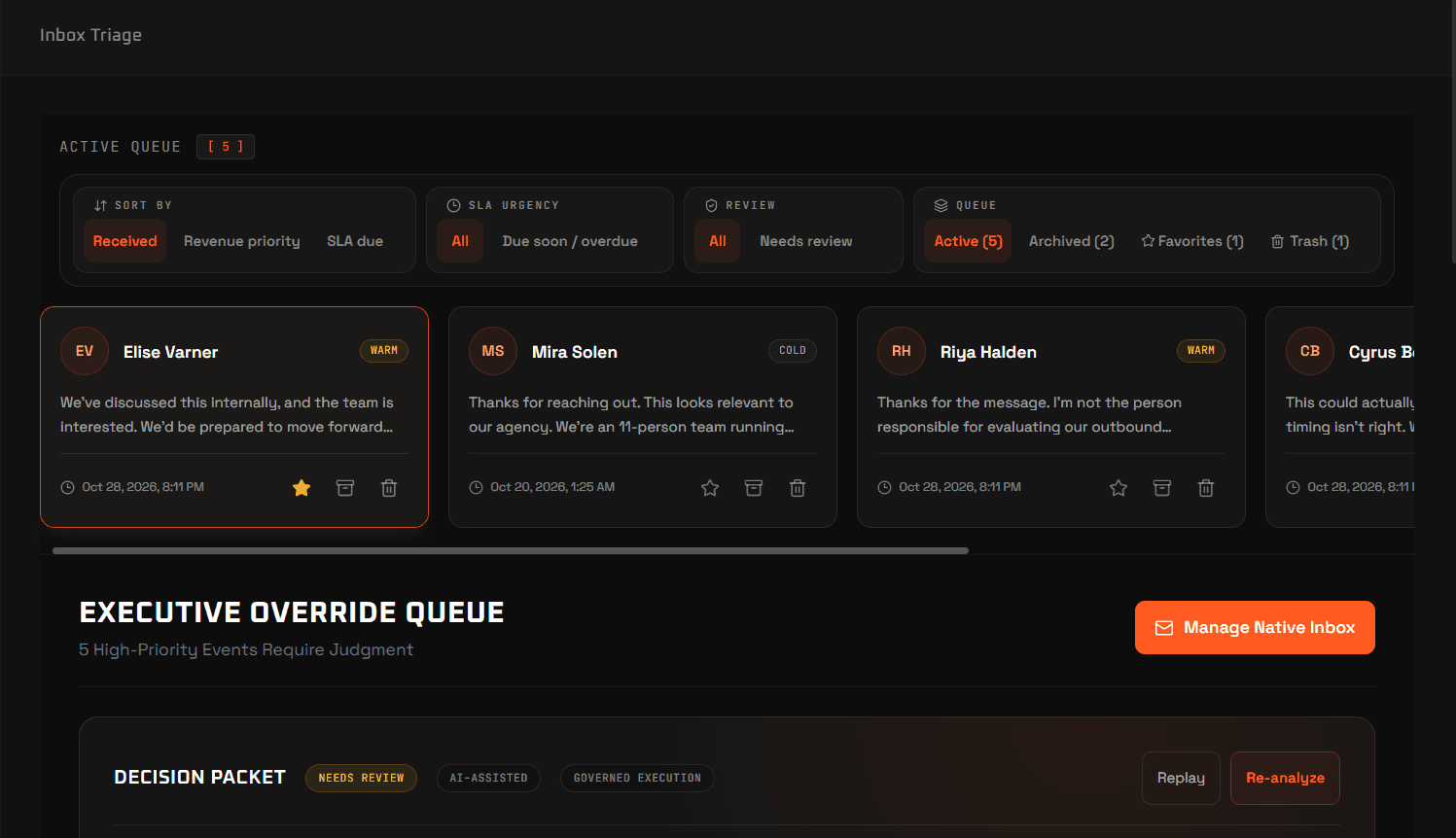
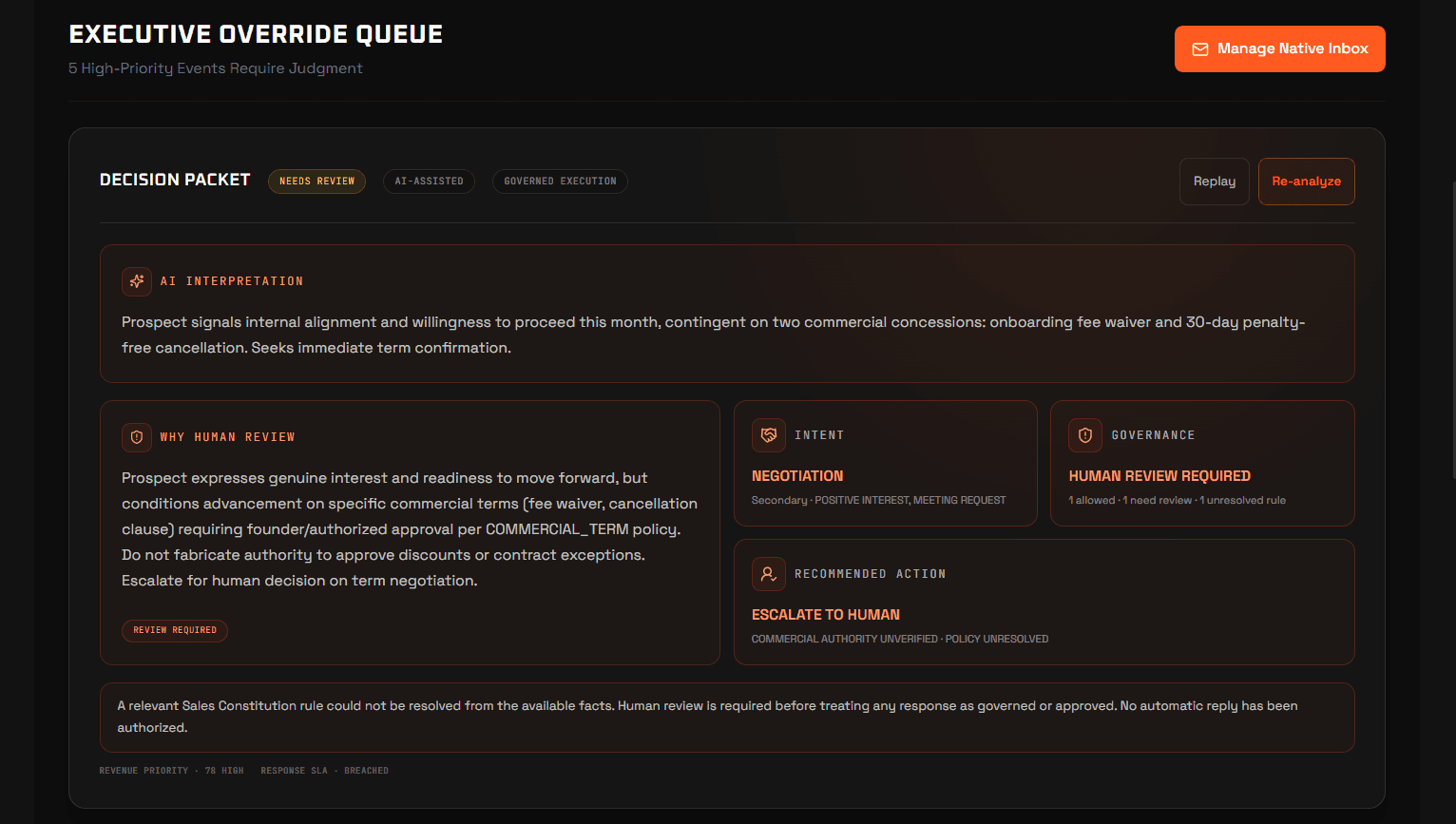
The public homepage includes a no-send Reply Decision Preview so you can inspect how different situations are interpreted. For paid operation, FrameLeads Core and Enterprise have different prospect limits and control capabilities; review the current plan details before choosing.
Sources and scope
This guide combines first-party FrameLeads product information with external material on outbound reply classification and search discoverability. Its questions are based on recurring industry themes and monitored AI queries, not a verified ranking of Google search volume. Example replies and screenshots are demonstrations, not real-customer outcome studies.
See the decision layer
Your prospect replied. Now what?
Choose a common outbound reply and see how the signals, context, and next decision unfold. The scenario preview is illustrative and does not send messages.